Windsurf guide: moving to Devin Desktop and verifying your first change
If you searched for Windsurf and landed on Devin, you reached the same product family. The official transition FAQ dates the Windsurf-to-Devin Desktop rename to June 2, 2026. The editor and familiar project workflow remain, while the agent experience has changed. This guide keeps the Windsurf name in its address so existing bookmarks still work.
Checked September 21, 2026. Setup, modes and pricing are vendor-documented. We independently ran the downloadable coding exercise with Node.js v24.11.1: the starter passed 2 of 9 cases and the reviewed reference passed 9 of 9. We did not benchmark Devin or use an editor trial to produce those results.
Understand the rename before migrating
The transition FAQ says existing settings and plans carry across; a rename alone does not mean your legacy account receives today's new-customer allowance. Existing .windsurfrules and .windsurf/rules/ files remain supported, while .devin/rules/ is preferred for new directory rules. Back up local configuration and inspect what the updated app loads before reorganizing a working project.
Cascade needs a more careful distinction. The FAQ described continued availability through July, while the current Devin Local documentation says new conversations use Devin Local or an available ACP fallback, and existing Cascade conversations remain in history. In September, do not assume you can start a new Cascade session because a January tutorial says so. Availability can depend on account, installed version and administrator settings. Use the agent selector you actually have.
Install and open the editor
Follow the current installation instructions for Mac, Windows or Linux. Linux package repositories now install devin-desktop; some repository addresses retain windsurf naming for compatibility. That mismatch is documented, not a reason to substitute an unofficial package. The Linux tarball does not update itself, whereas repository packages use the package manager. Check the vendor page for supported system requirements.
During onboarding, choose your keybindings and import VS Code or Cursor settings if useful. Open the small exercise folder below before pointing an agent at a larger project. An editor extension and an agent integration are different things: the transition FAQ describes the old Windsurf JetBrains plugin as being in maintenance mode and directs users toward Devin over ACP.
Pick the right agent mode
Devin Local's documented modes are Normal, Plan and Ask. Ask is suitable for understanding a function; Plan investigates and proposes an approach before implementation; Normal is the mode to use when you want the agreed code change. Its Plan mode is documented as read-only research with approval before implementation. For larger projects, a separate worktree helps isolate edits and tests before merging.
Legacy Cascade documentation uses different names. Its modes page lists Code, Plan and Ask, while older overview text still refers to Code/Chat. Do not apply a Cascade keyboard shortcut or old 20-tool-call claim to every Devin Local session. Check the current mode, agent and permissions shown in your installed app.
Before allowing edits, try this prompt on the exercise:
Read AGENTS.md, cases.mjs and slugify.test.mjs.
Explain the slug contract and reproduce the failing tests.
Propose a minimal fix to starter.mjs without editing yet.
Do not read reference.mjs or alter expected outputs.
Keep instructions durable and small
The supplied AGENTS.md defines the files the agent may change and the command that proves the change works. Keep it versioned alongside your project. It is easier to review than important instructions buried in a long chat. You can add separate rules when a real recurring mistake makes them useful.
The rules and memories documentation distinguishes manually written rules from legacy Cascade auto-generated memories. It says Devin Local does not persist those memories and points to a migration wizard for moving useful information into skills. Do not assume yesterday's Cascade memory is part of today's new agent context. Inspect the loaded customizations and restate essential constraints in project instructions.
A useful contract names the exact test command and acceptance behavior. “Always write good code” is difficult to verify. “Only edit starter.mjs, retain all nine cases, and run node --test slugify.test.mjs” gives both the agent and reviewer an observable finish line. Rules still need review: they are instructions, not enforcement guarantees.
Run a small exercise with real acceptance cases
Download the exercise ZIP, or run the browser demonstration first. Both use the same JavaScript implementations and case list. The Node runner needs Node.js 22 or later and no dependencies, API key or hosted service. If you ask an editor agent to help, that assistance may use your account allowance.
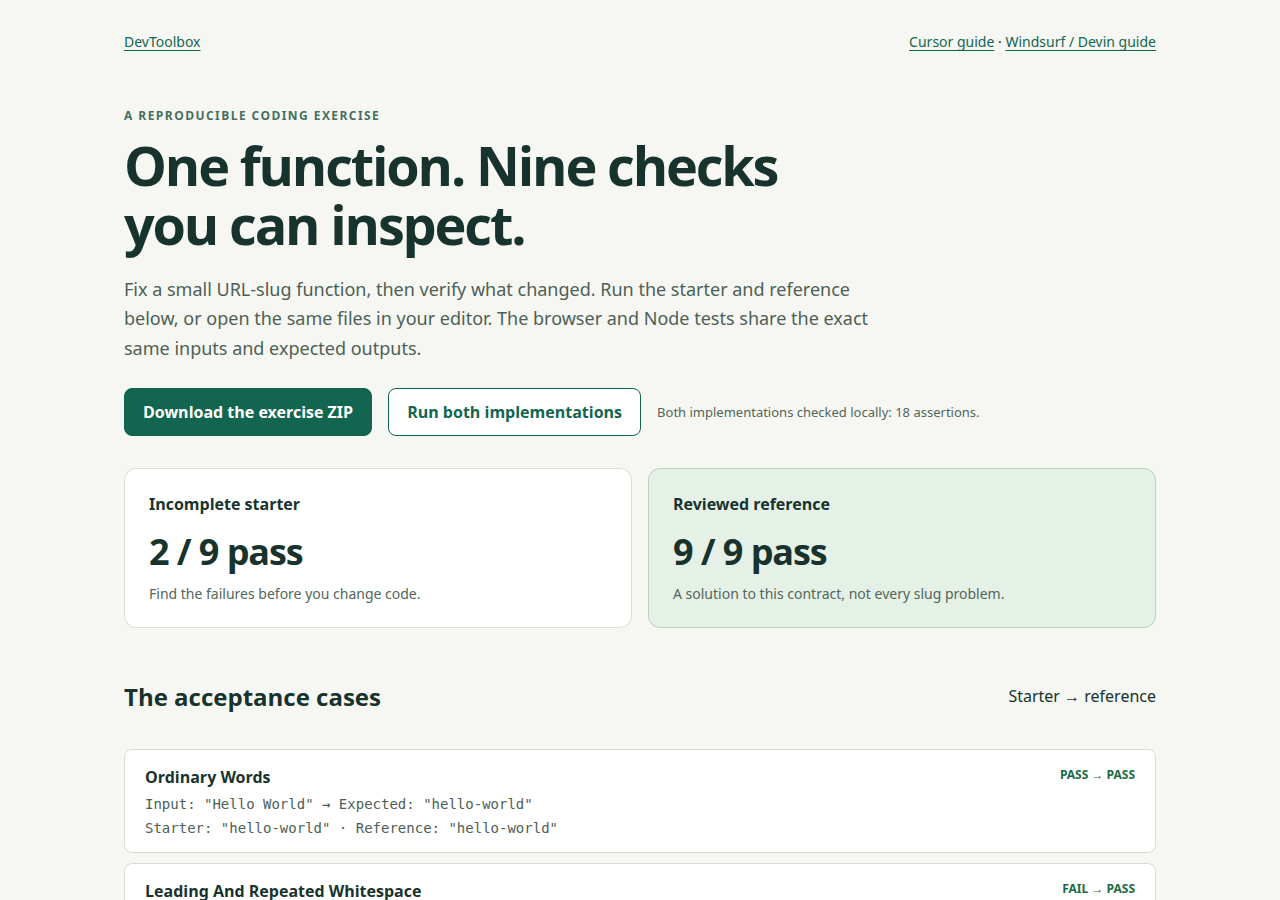
This is our locally running exercise, not a Devin interface screenshot or an AI performance benchmark.
Unzip the archive, enter the folder and run:
node --test slugify.test.mjs
Expect 2 passing and 7 failing tests before fixing anything. Ordinary words and empty input already pass. Repeated whitespace, punctuation, hyphens, accented Latin text, tabs/newlines, numbers/underscores and non-Latin-only text expose the incomplete implementation.
The function's contract is deliberately narrow: an ASCII lowercase slug with combining Latin accents removed, separator runs collapsed and edge hyphens trimmed. Crème Brûlée becomes creme-brulee. Release_2026.09 becomes release-2026-09. Non-Latin-only input becomes an empty string rather than a pretend transliteration. This lets you review behavior instead of judging whether an answer merely looks convincing.
Review the plan, then switch to the implementing mode available in your agent:
Make the agreed change in starter.mjs only.
Keep the supplied tests unchanged; install no dependencies.
Run node --test slugify.test.mjs and report the real counts.
Show the complete diff and explain remaining limitations.
Check the work before accepting it
The included README explains how to create a local Git checkpoint before editing. After the agent changes the function, inspect both formatting and behavior:
git diff --check
git diff -- starter.mjs
node --test slugify.test.mjs
A correct run should report nine passes and zero failures with the original tests. A change that deletes a troublesome case has changed the assignment. Stop and restore the expectation before evaluating the implementation. If no tests ran, run them yourself; a summary saying “should pass” is not evidence.
To compare against the supplied solution, first preserve your attempt:
cp starter.mjs my-attempt.mjs
cp reference.mjs starter.mjs
node --test slugify.test.mjs
Our starter results and reference results show the locally executed baseline. Passing these examples does not prove universal Unicode handling, input validation or unique URLs. Decide how your application handles an empty or duplicate slug before using a similar function in production.
Budget from your actual plan
Current Devin pricing, which Windsurf's pricing address now redirects to, lists the following new-customer monthly options:
| Plan | Price | What to check |
|---|---|---|
| Free | $0 | Light agent quota and limited models |
| Pro | $20/month | Increased quota and frontier models |
| Max | $200/month | Higher quota |
| Teams | $80/month base + $40/full developer seat | Seat types and shared team needs |
Free includes unlimited inline edits and Tab completions. Paid quotas refresh daily and weekly; model choice, task size and reasoning affect consumption. Extra usage is purchased separately at API pricing. Do not convert this into an invented number of free features or reuse the old $15/500-credit table. Existing legacy accounts may retain different terms, so check the account dashboard before changing plans.
Compare workflow and total cost
Our IDE-assistant comparison lets you review editor subscriptions and source dates. The Cursor guide applies the same exercise to another editor workflow. Reusing the cases helps you compare review effort, retries and actual account consumption without changing the task between tools.
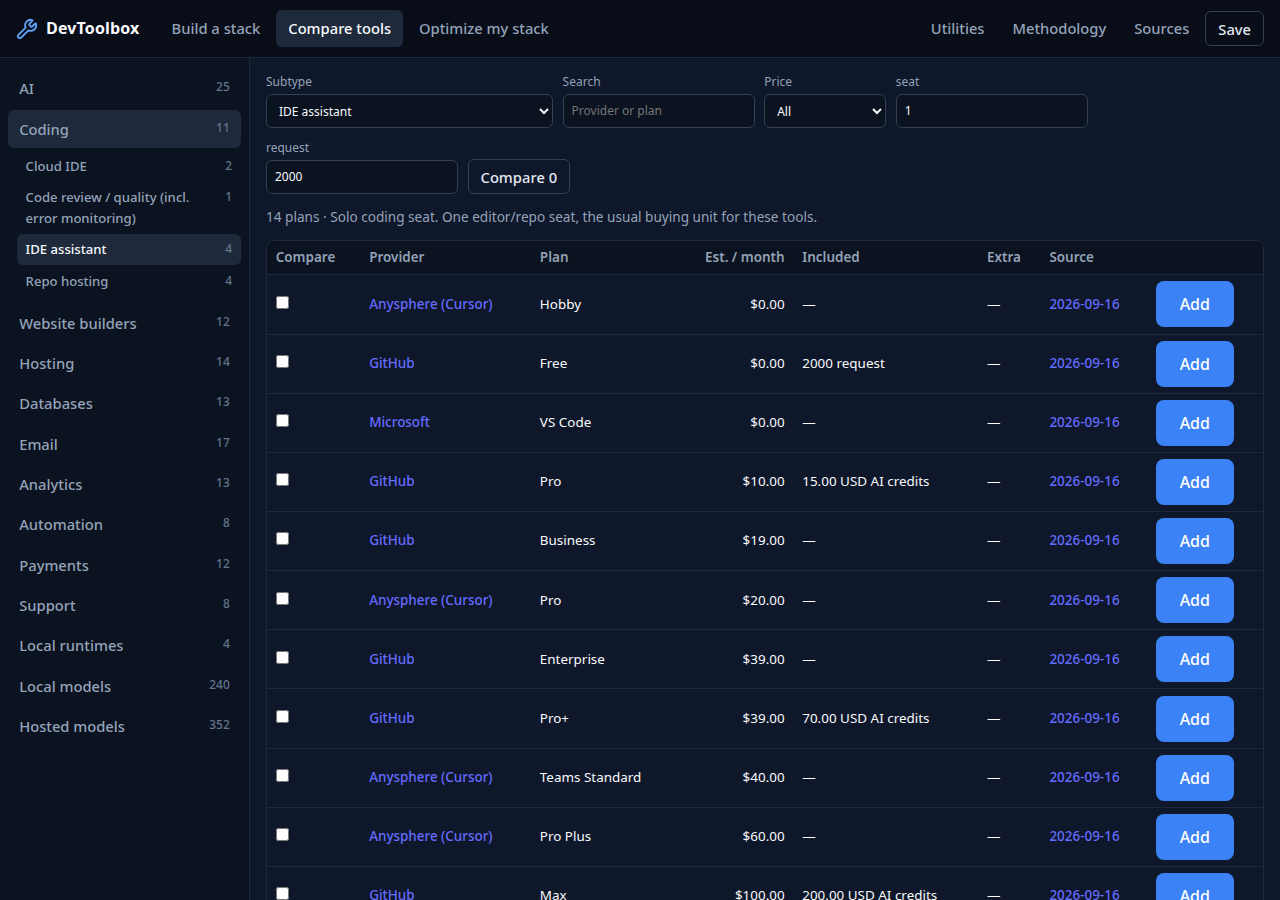
API token prices in the hosted-model comparison are useful context, but they are not a direct substitute for editor-plan pricing. Record your installed version, selected agent/model and measured usage before deciding which tool fits. This guide does not claim that either editor is faster or more accurate.